
One of the common complaints our customers have is that they can’t tell which field they are in when using FileMaker. Before FileMaker 9, there was no way to fix this for them. With the addition of conditional formatting, not only can you highlight the active field but you can make it bold, a different color or perhaps even enlarge the font.
##Highlighting the Field
I’m going to explain how to do it and then explain why it works. Let’s say you have a field on your layout that you want to turn yellow whenever it’s active (ie, you click in it, tab to it or have some script that selects it, etc.). The first thing you do is select the field and set the Fill Color to yellow. I know, I know, this really doesn’t make much sense because you only want the field to appear yellow when it’s *active*. Well, just bear with me and I will explain latter.
> Credit where credits due: I first saw this technique at DevCon 2007 demoed by Andy LeCates. He of course is a genius but couldn’t take credit for this one. Apparently it was Chad Novotny who actually came up with this one. Thanks for the good work Chad.
Next thing we’re going to do is to set the conditional formatting on the object. Select the object and either right click and go to `Conditional Formatting` or go to the Menu `Format >> Conditional`.
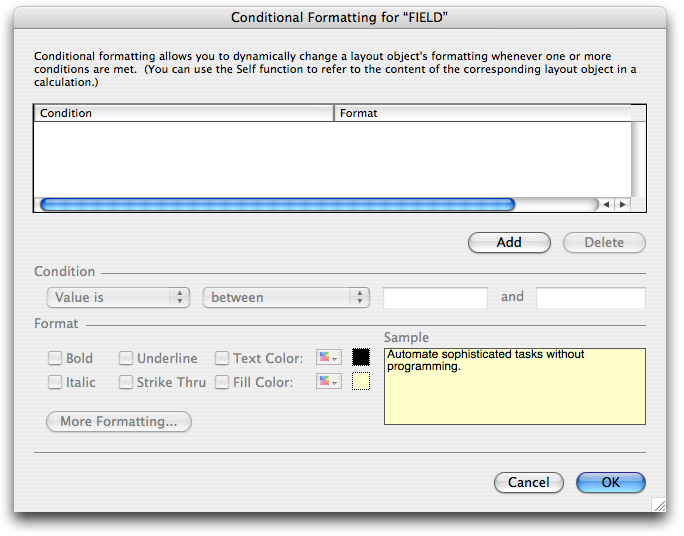
Once you see the above window, click the add button to add a condition. Now click on the Pop-Up under conditional and select `Formula is` and then type true in the calculation box like so:

This condition tells FileMaker that *when* Conditional Formatting rules apply *always* apply this formatting (Note the when this is the essence of the technique). Now we just need to pick what we want to conditional formatting to do, so let’s keep it simple and change the Fill Color to white. Your final conditional formatting dialog should look exactly like this:
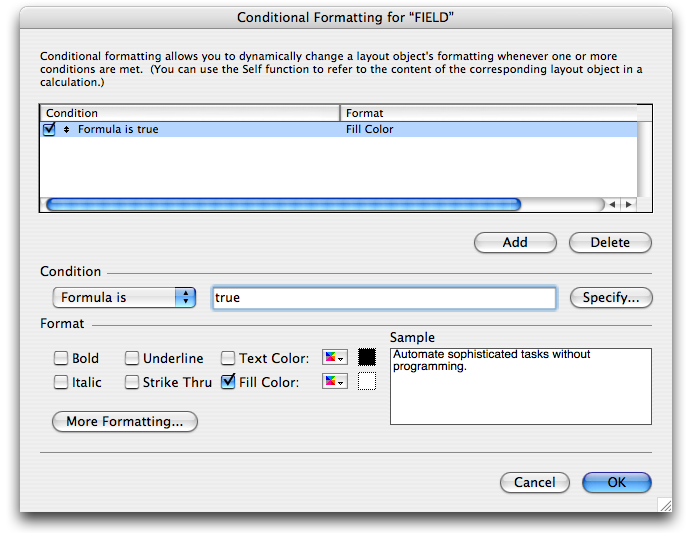
Believe it or not you are finished.
##What’s going on here?
The reason why this highlighting trick works is that the Conditional Formatting does *not* apply to the active field. This means that during normal browsing the user will see the formats that are specified in our conditional formatting rule. But if they were to click in the field, those conditional formatting rules apply.
What we did was override the formatting of our yellow field with white and then the field becomes active conditional formatting stops and the yellow shows through. Using this idea you can override any style that conditional formatting allows.
A good general rule is to format the object on the layout how you would like it appear when the field is selected. Then override any of the formats of that field, using the same condition described above, so it that appears the way you prefer in browse mode. Play around with it… I’m sure you will find that you can do some interesting things with this feature.
cool, Jesse. But that 2nd screenshot is veeeeeeery small. 😉
Well explained, guys.
How about highlighting the current row in a list view? I’d like to do this without scripts, so the user can use the rolodex, and the background of the selected record would show with a blue background. I’m guessing this would use conditional formatting and the get(recordNumber) function. Any ideas?
@Chris,
You didn’t bring your reading glasses huh…. Yea, don’t know what happened to that screen shot… Fixed now.
@Sam,
Yea I wish there were something akin to Get(ActiveRecordNumber) because that is really what we would need to get the highlighting of the current row to work. Then you could say something like Get( ActiveRecordNumber ) = Get( RecordNumber ) in the condition and you would be all set. Sounds like a feature request.
Geoff and I have had the same discussion numerous times before… it definitely would be a nice option to have.
Very cool but I would note that you can highlight the current field in FMP8.
If you want yellow, set the body colour to yellow, put a white box (or whatever you want the background colour to be) on the layout, place your fields on top of that, and, most importantly, in Layout Setup un-check Show Field Frames When Record is Active.
Of course this is only a means of changing the field colour when selected and does not give the range of options available with conditional formatting.
I also don’t know if this setting was available in 7 or not but it is there in 8.
Hola Jesse,
John Mark has some sample files that do this. One of them was created by Ray Cologon. Do a search for “hilite record”.
@orlando: Ray’s stuff is pretty fantastic, but in this particular case, it doesn’t fit the bill. His solution uses the ZipScript plug-in. Sam’s request specifically stipulated “without scripts.”
I really truly think it simply can’t be done without scripts or plug-ins. But if there were a
Get(ActiveRecordNumber)function I think it would probably be possible.Hola Geoff,
You must have looked at a different file:
This is the explanation text that is included with Ray’s file via John Mark’s site:
@Orlando – Geoff stands corrected…. I didn’t think you could do it either for that matter. As Long as you make sure that your webviewer in the subsummary part is as large as any screen anyone viewing your solution is using, you’ll get an active row highlight.
It’s really quite clever. I’ll probably write that one up some time. Thanks a lot for the info.
@Orlando: My apologies to you and Ray. I found an older version, Jesse found the newer, script-and-plug-in-free version. Very clever and effective. I love it 🙂
Sam, if you’re still reading, check this out. Amazing.
Would it be appropriate to credit the person/company who came up with this technique presented by Andy LeCates at DevCon 2007?
I’m not really sure who came up with it. First time I saw it was definitely Andy LeCates at DecCon 2007. Do you recall whom he mentioned as the person he saw it from?
@Jesse: I believe it was Chad Novotny who came up with this idea…
@Geoff: No need to apologize! And thanks a lot for this great resource for the FM community!
SWEET!! Works a treat, cheers, Laurie
Works great in Pro. Does not work on FMgo. When using popmenus the menu roller can be 2 field below the actual fields so users cannot tell when fields that are selecting.
Anyone solved this?
Tim